
Strange Eight, for Digitakt, Digitakt II and Digitone II
Your Digitakt, more so.
Strange Eight turns your Digitakt, Digitakt II, or Digitone II into a playable studio desk with a sound of its own. Drive, EQ, compression and eight effect sends live on the hardware encoders, so every mix move can be p-locked, LFO'd and sequenced with the rest of the track.
It's a Mac app, not a firmware mod. Nothing to flash: your hardware stays on its standard factory OS.

- 8channel strips with drive, EQ and compression
- 8sends into studio effects
- 1USB cable connects everything
- 0firmware mods or CC remapping
01 Hear it
The same Digitakt track, peak-matched. Flip between the raw output and Strange Eight while it plays.
You're hearing color, weight and punch, under the same headroom. A bigger, finished, release-ready sound, with no DAW, no bouncing stems and no plugin chains.
Both mixes are normalized, with the raw mix using the Digitakt's native compressor with default settings. No effect sends are used in either mix.
You stop mixing after the track is written and start writing with the mix.
02 How it works
The top track button row is the audio. The bottom row plays the desk.
- One cable Audio and MIDI travel over Overbridge on a single USB cable. The mix comes back out of the hardware's MAIN OUT.
- Set up tracks 9 to 16, once Make them MIDI tracks, one per strip. It takes minutes, step by step.
- Play The factory CCs already line up with the desk. Turn a knob on track 9 and strip 1 moves.
Top row: audio
- T1
- T2
- T3
- T4
- T5
- T6
- T7
- T8
Bottom row: plays the desk (strip, then its effect on SRC)
- T9 S1 Strip 1 Plate
- T10 S2 Strip 2 Hall
- T11 S3 Strip 3 Gated reverb
- T12 S4 Strip 4 Clean delay
- T13 S5 Strip 5 Tape delay
- T14 S6 Strip 6 Multi-tap delay
- T15 S7 Strip 7 Phaser
- T16 S8 Strip 8 Granular
- 1
- 2
- 3
- 4
- 5
- 6
- 7
- 8
Strange Eight: eight strips
Shadow tracks
The hardware's eight MIDI tracks become the automation layer for the mix. T9 plays strip 1, T10 plays strip 2, through to T16 and strip 8.
- P-lock all the things. Every control is an ordinary MIDI CC from a hardware MIDI track, so parameter locks, live-recorded knob moves, trig conditions and LFOs all reach the mix.
- One-way and predictable. The hardware drives the app and the app never writes back.
- Smoothed controls. P-locks and LFOs don't zipper or click; stepped controls step cleanly.
Your knobs, already mapped
Factory CCs, no remapping. On Digitakt II and Digitone II the FLTR and AMP pages of each shadow track carry the strip and its sends, and the SRC page plays that track's effect.
Point spare knobs at deeper effect parameters on CC 86 to 93. An external MIDI controller works too, for reaching more without a mouse.
Digitakt II and Digitone II
FLTR: dynamics and EQ
- DRIVE
- TONE
- COMPRESS
- TRIM
- LOW
- MID FREQ
- MID
- HIGH
AMP: sends
- 1 PLATE
- 2 HALL
- 3 GATED
- 4 CLEAN
- 5 TAPE
- 6 MULTI-TAP
- 7 PHASER
- 8 GRANULAR
SRC on T9: the plate
- PB TONE
- AT SIZE
- MW DECAY
- BC MOD DEPTH
Digitakt
VAL page: desk, dynamics, EQ
- DRIVE
- TONE
- COMPRESS
- TRIM
- LOW
- MID FREQ
- MID
- HIGH
SRC on T9: the plate
- PB TONE
- AT SIZE
- MW DECAY
- BC MOD DEPTH
One VAL page per track, so the eight knobs default to the strip. Reach a send by re-pointing a VAL to CC 78 to 85. Pan each strip on CC 10.
One cable, one clock
- DIGITAKT Eight track streams out over USB
- STRIPS Desk, EQ, compressor, level
- SENDS Eight studio effects
- OVERBRIDGE The mix returns to the hardware
- MAIN OUT Straight to your speakers
No separate audio interface, no aggregate device, no independent audio clocks drifting apart.
03 The desk
More colour without more volume. Drive and compression both compensate their own output, so you hear the character change while the level holds.
- DESK Drive and tone
- EQ Low, mid frequency, mid, high
- COMPRESS One knob
- TRIM Where the track sits
- 8 SENDS Post-fader, additive
Drive and tone
Saturation is part of the channel, so the mixer itself has a sound. A desk doesn't ask how much desk you want: there's no dry/wet.
- Character and warmth at musical settings. It thickens and rounds peaks long before it sounds like guitar distortion.
- Calibrated compensation: more drive changes harmonic density and transient shape while loudness stays put. Quiet hits come up a little and hot ones are held back, like a real gain stage.
- TONE moves where the saturation happens. Brighter pushes more low end into the drive and fills the top with its harmonics. It reads like EQ and changes the distortion itself.
- 4× oversampled, so pushed drive stays free of aliasing grit.
- Drive at 0 is exactly clean and unity; the desk fades in over the first few dB. A drive LED shows how hard each strip is working.
- 0 dB, clean
- +6 dB
- +12 dB
- +18 dB
TONE -1 darker
5.2 %
60 Hz
2.5 %
600 Hz
20 %
6 kHz
H4 and up: above 20 kHz
TONE 0 centre
7.3 %
60 Hz
4.8 %
600 Hz
11 %
6 kHz
H4 and up: above 20 kHz
TONE +1 brighter
16 %
60 Hz
3.8 %
600 Hz
5.2 %
6 kHz
H4 and up: above 20 kHz
- Odd harmonics
- Even harmonics
- H2 to H9, 0 to -80 dB below the fundamental
EQ
Three bands tuned for electronic music: two characterful fixed bands and a sweepable mid. It sits after the desk, so it shapes what the saturation produced.
- LOW is a boost tuned for kick and sub, with the dip placed where dance mixes get muddy. Cut becomes a shelf that clears everything under the kick. Measured against a British desk.
- MID sweeps 30 Hz to 10 kHz, down into sub territory an analog desk mid rarely reaches. Use it as a second sub boost, or to cut low mud.
- HIGH is an 8 kHz shelf with the slight opposite-sign dip of an analog shelf.
Make your 909 pound.
LOW
Boost is a 60 Hz bell with a dip at 200 Hz. Cut is a shelf.
MID sweep
30 Hz to 10 kHz, down into sub territory.
MID at 1 kHz
Boosts stay broad. Cuts narrow as they deepen, for notching a resonance.
HIGH
8 kHz shelf with the slight opposite-sign dip of an analog shelf.
Compressor
One knob. COMPRESS sets how deep it reaches; attack, ratio and release live under the hood.
- Automatic make-up gain, calibrated on drums. COMPRESS changes squash and density while TRIM keeps meaning where the track sits. That's why one knob works.
- Program-dependent, SSL-style auto release. Short hits recover fast so drums keep their punch; sustained compression recovers slowly so pads don't pump.
- A sidechain high-pass, so the kick doesn't pump the whole track.
- Stereo-linked, soft knee, zero added latency, with a gain-reduction LED.
Beyond the analog desk
- Sub on the midThe mid band doubles as a sub boost, independent of the low band.
- Broad boosts, surgical cutsBoosts stay broad and musical; cuts narrow as they deepen.
- One-knob compressionWith automatic gain, so level stays where you left it.
- Dance-tuned EQBands placed for kick, sub and the mud between them.
- Every knob sequenceableP-lock it, LFO it, record it live.
- Waveform historyOn every channel, on screen.
- Clean when offDrive 0, COMPRESS 0 and any EQ band at 0 dB are out of the circuit. Nothing touches your sound until you ask it to.
04 Play the effects
Every shadow track also plays one effect. The SRC page's four performance controls reach straight into it: T9 plays the plate, T16 the granulator.
PB, AT, MW and BC on eight tracks: that's 32 effect controls under your hands, alongside every channel's eight sends. Lock them, LFO them, sequence them.
- Delay feedback swelling on one step.
- Reverb decay opening in a breakdown.
- Granular pitch walking up a bar.
The granulator is another instrument
- Hold a key on track 16 and it captures a loop: on the grid from 1/32 to a bar, at the pitch of the key you hold, or as a grain cloud.
- Keys transpose the frozen loop chromatically from a root note, like a sampler. A snare becomes a pitched part with no resampling.
- Change the division while frozen and the same capture is re-cut. Scan steps back through about four seconds of recent audio.
Rhythm is built into the effects
- The Euclidean multi-tap turns a single hit into a phrase: hits over steps, rotate, decaying or swelling taps, stereo spread. Three over eight is the tresillo.
- The phaser locks to the bar, so a two-bar sweep lands on the same downbeat every time.
- Three delays with dotted and triplet divisions, and tape-style glides when you change the time.
Compositional tools as much as spatial ones.
3/8 The tresillo
5/8 Swelling taps
7/16 A phrase across the bar
The gated reverb
Opens on each hit, holds, then closes on a curve. Subtle, snappy drum ambience at low sends; the full 80s gated snare when you push it.
05 The eight effects
Eight sends, eight studio effects, ready before you touch anything. No plugins to load, no destinations to assign.
Each effect has its own voicing and a calibrated return level. The layout is fixed, so it builds muscle memory, closer to owning a particular desk than assembling software.
-
Plate
Tight, bright ambience with a modulated tank.
- PB
- tone
- AT
- size
- MW
- decay
- BC
- mod depth
-
Hall
Large, dark, smooth tail that stays smooth on repeated drum hits.
- PB
- tone
- AT
- size
- MW
- decay
- BC
- mod depth
-
Gated reverb
Opens on each hit, holds, closes on a curve. Snappy drum ambience, or the full 80s snare smash.
- PB
- tone
- AT
- size
- MW
- release
- BC
- gate
-
Clean delay
Dotted-16th ping-pong. Offset pushes echoes off the grid for swing or slop.
- PB
- tone
- AT
- division
- MW
- feedback
- BC
- offset
-
Tape delay
Dotted quarter that darkens and saturates with each repeat. Wow from subtle to seasick.
- PB
- tone
- AT
- division
- MW
- feedback
- BC
- wow
-
Multi-tap delay
A Euclidean rhythm of echoes that can carry a part on its own.
- PB
- tone
- AT
- division
- MW
- feedback
- BC
- hits
-
Phaser
4 to 12 stages, seven LFO shapes, locked to the bar, with an envelope follower.
- PB
- center
- AT
- rate
- MW
- depth
- BC
- env
-
Granular
Pitch, cloud and freeze. Keys on track 16 capture and re-pitch loops.
- PB
- pitch
- AT
- size
- MW
- feedback
- BC
- loop
- Eight sends per channel, additive and post-fader like a console. Dry is never replaced.
- Returns are level-matched and soft-saturated.
- Delays, the phaser LFO and the granular loops follow the hardware's clock and transport.
- Idle buses sleep, so unused effects cost nothing.
06 The screen
Hardware for control, screen for understanding.
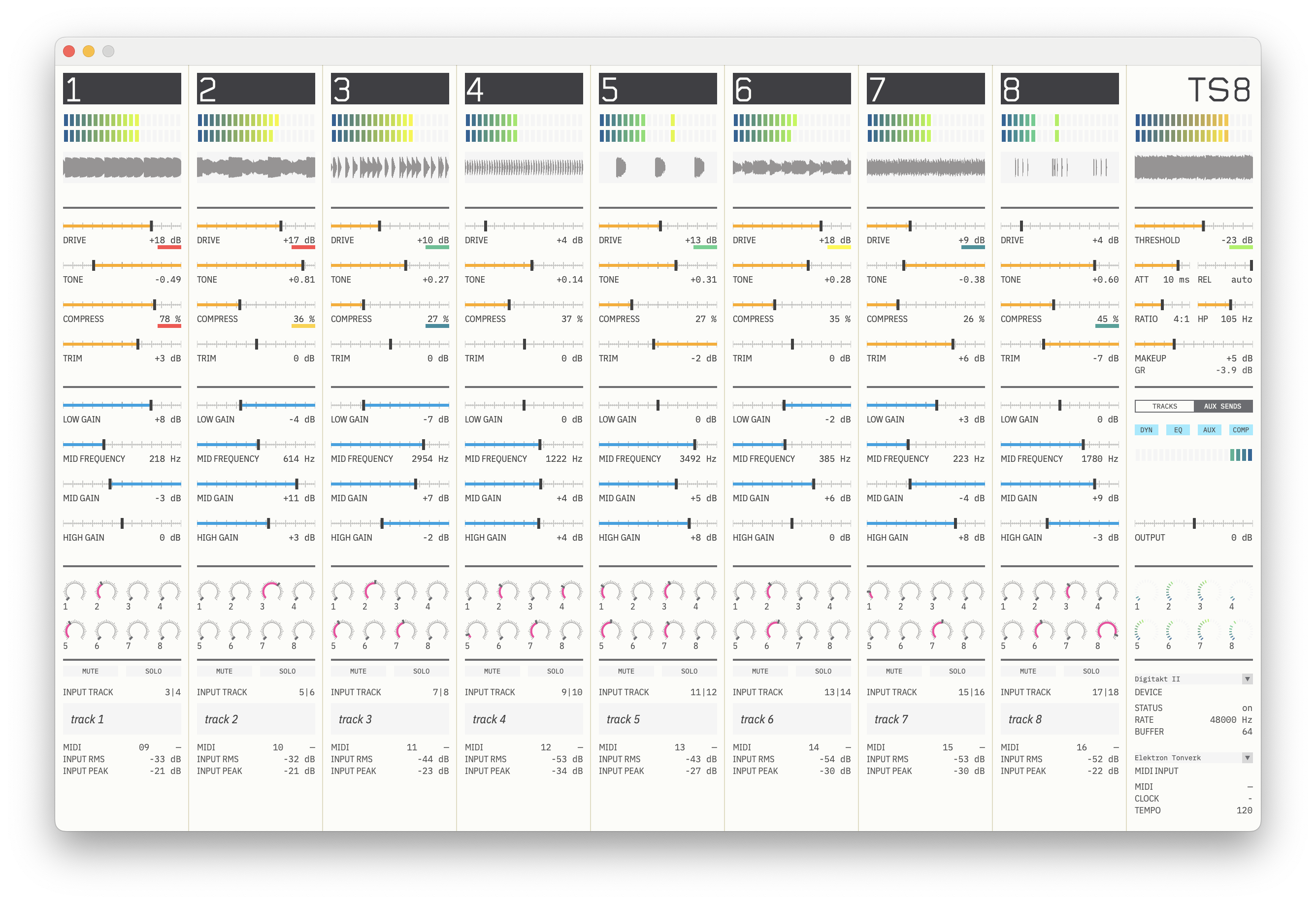
The screen shows what the hardware can't. Playing happens on the hardware; the mouse is for setup and deep effect settings.
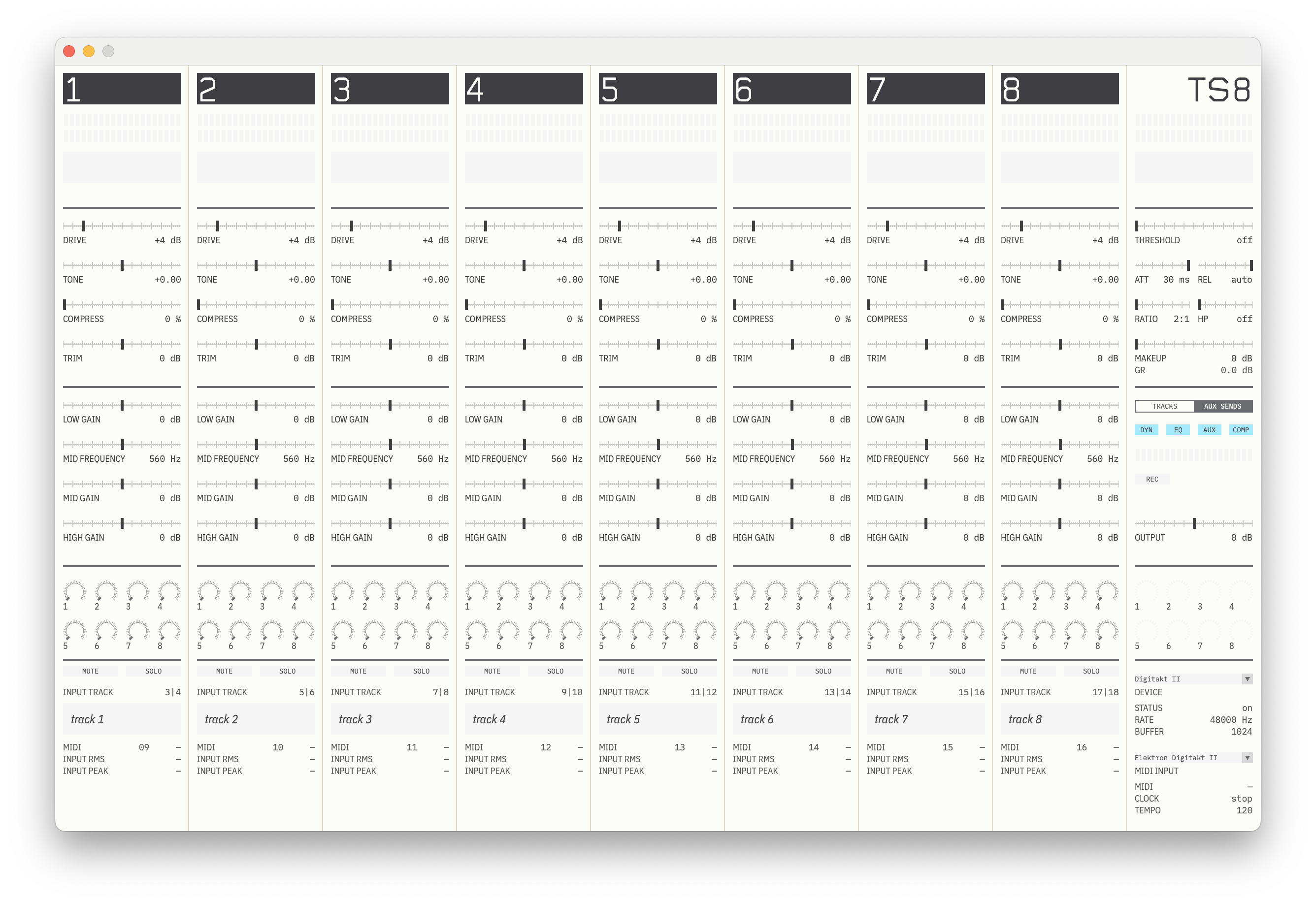
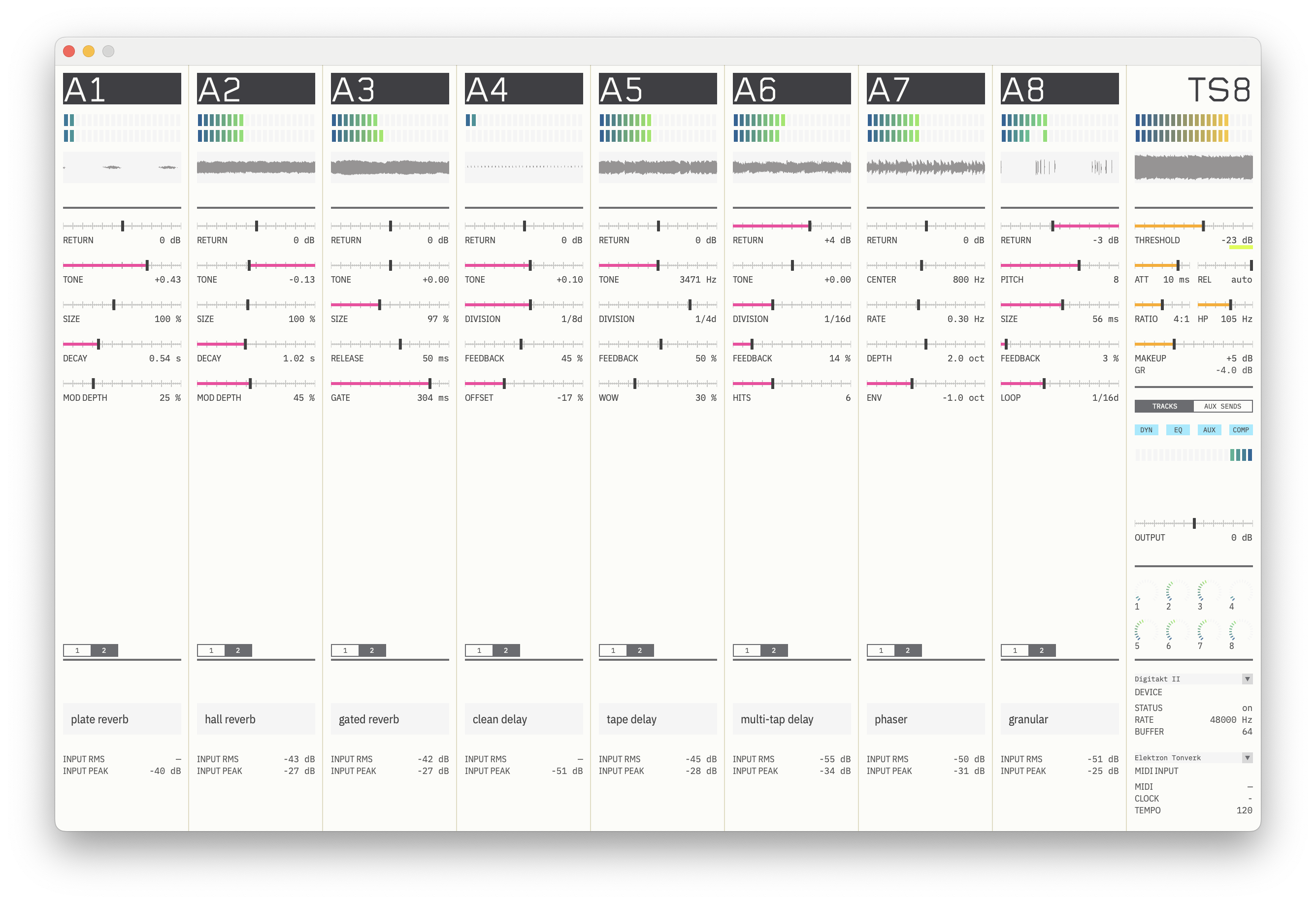
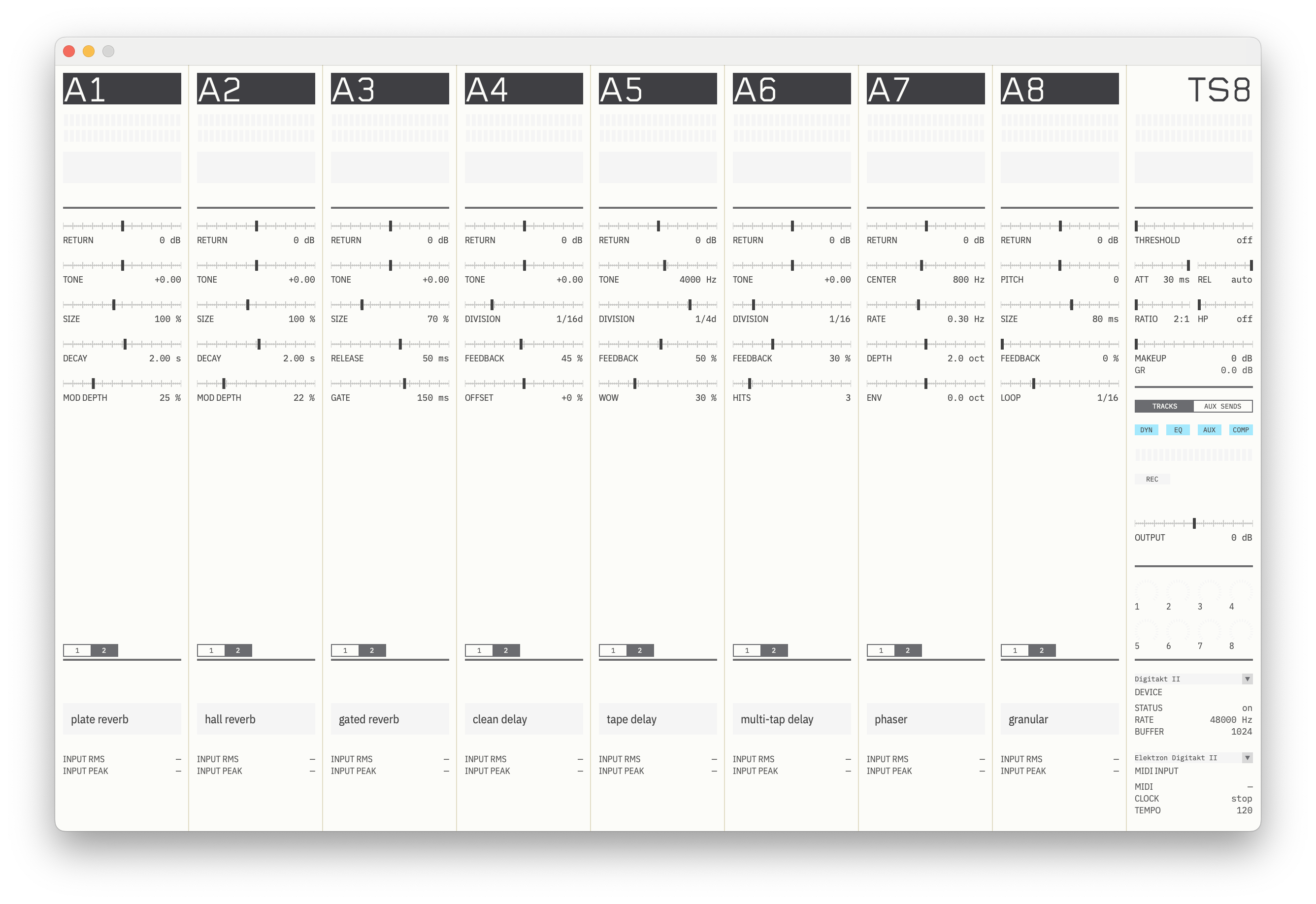
- Dynamics
- EQ
- Sends
- Positions at a glanceColoured lines show every control away from default. A default desk is clean; a worked one shows where the work is.
- Eight strips and a masterIn the hardware's track order.
- Waveform historyOn every strip.
- Meters to mix withDrive and compressor LEDs, stereo LED meters with peak hold, slow RMS readouts for setting levels.
- Aux sends viewPress Tab for return meters and every effect parameter.
07 Built to last
For finished songs and releases, not just one improvised session.
- Versioned soundEvery effect has a fixed identity and revision, so a saved song sounds the same after an update.
- Full project recall.ts8 projects keep every knob, send, effect parameter, name and mute.
- Crash recoveryUnsaved work is offered back after a crash.
- Audio survives the UIThe screen can stall without a dropout.
- Reconnects on its ownWhen Overbridge restarts or the hardware power-cycles. Your last project reopens at launch.
08 Compatibility and setup
Built for the Digitakt, Digitakt II, and Digitone II. All on the standard factory OS.
- Digitakt II Supported Eight stereo track streams. 16 VALs per shadow track: eight for the strip, eight for the sends. The easiest setup.
- Digitakt Supported Mono track streams and one VAL page per track, defaulting to desk, dynamics and EQ. Reach a send by re-pointing a VAL; pan each strip on CC 10.
- Digitone II Supported Same setup as Digitakt II.
Requirements
- A Digitakt, Digitakt II or Digitone II on its standard factory OS. No firmware mods, nothing to flash.
- A Mac with macOS 15.7 or later. Tested on Apple silicon.
- Elektron Overbridge, with Overbridge Engine running.
- One USB cable.
- Microphone permission. macOS treats every audio input as a microphone, Overbridge included.
Setup, once
- USB CONFIG Overbridge
- INT TO MAIN Off
- MIDI OUT USB
- CLOCK SEND, TRANSPORT SEND On
- TRACKS 9 TO 16 MIDI machines, each on its own channel, VALs on
Takes minutes. Full setup guide
09 What it isn't
- A firmware mod. Nothing to flash. Your hardware stays on its factory OS.
- A DAW. No recording, arrangement, piano roll or sequencer.
- A plugin host. No AU or VST.
- A general mixer. Eight tracks, by design.
- Configurable routing. The eight effects are fixed.
- Cross-platform. macOS only, since Overbridge is the dependency.
- An account. No sign-in, no cloud.
FAQ
Do I need an audio interface?
No. Audio returns over Overbridge to the Elektron hardware and leaves through its MAIN OUT.
Is it a firmware mod? Do I have to flash anything?
No. Strange Eight is a Mac app, not firmware. Nothing is installed on your hardware: it runs on the standard factory OS and talks to it over Overbridge and ordinary MIDI. Quit the app and your instrument is exactly as it was.
Does it work with the original Digitakt?
Yes, verified on hardware. Eight audio tracks plus eight MIDI tracks is exactly the shape Strange Eight is built around.
Does it work with Digitone II?
Yes, verified on hardware. The setup is the same as on Digitakt II.
Do I have to map MIDI?
No remapping: Strange Eight listens on the Digitakt's factory CCs. You set up the eight shadow tracks once, and the guide walks you through it. Additional parameters can be mapped if desired.
Why does it ask for microphone access?
macOS treats every audio input as a microphone, Overbridge included. Strange Eight needs it to hear the hardware tracks.
Will my songs change after an update?
No. Every effect is versioned, so a saved project sounds the same after an update.
What's the latency?
About 0.9 ms per strip from the desk stage, plus your audio buffer. The compressor adds none.
Can I use an external MIDI controller?
Yes. Everything is ordinary MIDI, so a controller can reach more parameters without a mouse.
Eight tracks are enough.
Strange Eight turns the Digitakt, Digitakt II, or Digitone II into a studio desk that becomes part of the instrument.